
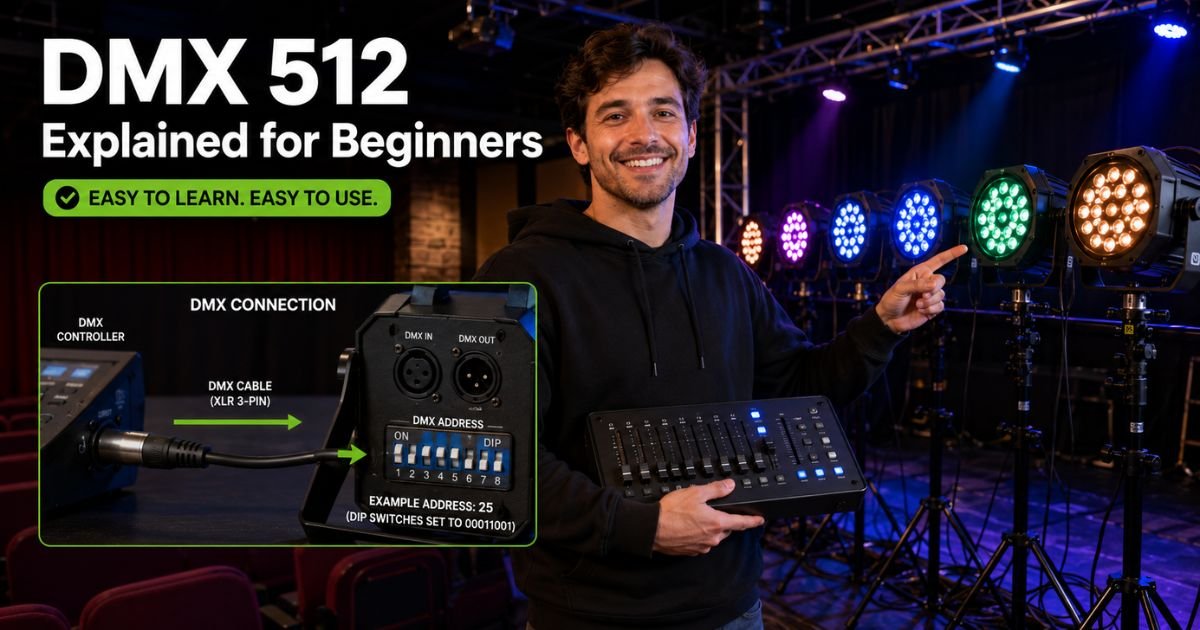
Picture yourself at your first gig. The band is about to start, the crowd is waiting, and you are staring at a lighting console wondering how to make those lights actually do something useful.
You have heard the term DMX 512 tossed around, but it sounds like tech speak for rocket scientists. Do not worry. You are not alone, and it is way simpler than it looks.
DMX 512 is the universal language that lets your controller talk to lights, fog machines, moving heads, and more. It has been the go-to standard since the 1980s and is still going strong in 2026.
The best part? Once you understand three key ideas, channels, addresses, and universes, everything clicks into place.
You will learn exactly what each piece does, why it matters, and how to set everything up yourself. No prior experience needed.
What Is DMX 512 and Why Should You Care?
DMX 512 stands for Digital Multiplex 512. Think of it as a simple digital signal that travels down a cable and tells each light exactly what to do. One cable can carry instructions for up to 512 separate controls at the same time.
It works like a chain of Christmas lights, but instead of just turning on and off, each light can dim, change color, move, or spin.
The beauty is that DMX 512 is rock-solid reliable. It does not need Wi-Fi, apps, or complicated apps. Just plug in a cable, set a few numbers, and it works every single time.
Whether you run lights for school plays, DJ nights, church services, or small festivals, understanding DMX 512 gives you total control without spending a fortune on wireless systems.
How DMX 512 Channels Work
Channels are the smallest building blocks in DMX 512. Each channel is like an individual volume knob on a mixing board. It carries one piece of information from your controller to a light.
Every channel has a value between 0 and 255. Zero usually means “off” or “minimum,” while 255 means “full on” or “maximum.” In between are all the shades of dim, speed, color, and position.
Here is what a typical channel might control:
- Dimmer intensity for a basic par light
- Red, green, or blue color mix in an LED fixture
- Pan or tilt position on a moving head
- Fog output level on a haze machine
- Speed of a gobo wheel or prism rotation
Most simple lights use just one channel. Fancier fixtures might need 5, 15, or even 30 channels each. That is why you need to know how many your gear uses before you start patching.
Understanding DMX Addresses: Your Fixture’s Starting Point
Every fixture on the line needs its own unique starting number called a DMX address. This address tells the light “Hey, the first channel that belongs to you starts here.”
Addresses run from 1 to 512 in a single universe. If your light needs three channels (for example red, green, and blue), you set its address to 5. That means it will listen to channels 5, 6, and 7. The next light must start at channel 8 or higher.
Most fixtures let you set the address two ways: old-school DIP switches on the back or a digital menu screen. Beginners often start with DIP switches because they are simple and do not need power to remember the setting.
Pro Tip: Always write down every fixture’s address on a piece of tape and stick it right on the light. Five minutes of labeling saves hours of frustration when something stops working mid-show.
What Are DMX Universes and When Do You Need More Than One?
One DMX 512 universe gives you exactly 512 channels. That is plenty for a small setup with ten or fifteen basic lights. But once you add moving heads, LED video walls, or a bunch of intelligent fixtures, you quickly run out of room.
That is where universes come in. Each new universe acts like a completely separate DMX 512 cable. Your controller can send out two, four, or even dozens of universes at once.
Fixtures in different universes do not see each other’s signals. So you can have Universe 1 running your stage lights and Universe 2 handling the house lights without any overlap or confusion.
Common Mistake: Trying to squeeze too many channels into one universe and causing lights to behave strangely or not respond at all. Always check the total channel count before you patch and add a new universe when you get close to 512.
Real-World Example: How Alex Set Up His First DMX 512 System
Take Alex, a 27-year-old youth pastor who volunteered to run lights for his church’s weekend services. He bought four simple LED par lights and one moving head, but had no idea where to start.
Alex printed out the manual for each light, noted how many channels they needed, and set the first par at address 1, the second at 5, and so on. When he reached the moving head that needed 14 channels, he jumped to a new universe to keep things clean.
His first service looked professional, the lights moved on cue, and the congregation actually noticed the difference. Alex now teaches other volunteers the same simple system he learned in one afternoon.
Quick Comparison: Single Universe vs Multiple Universes
Here is a handy table to help you decide how many universes you need for your setup:
| Setup Size | Channels Needed | Universes Required | Best For |
|---|---|---|---|
| Small stage (4-8 lights) | Under 150 | 1 | DJ gigs, small rooms |
| Medium show (10-20 lights) | 200-450 | 1 | School plays, small bands |
| Full production (25+ lights) | 500+ | 2 or more | Concerts, theaters, festivals |
| Large event with video | 800+ | 3+ | Corporate events, big festivals |
Use this as a quick reference whenever you are planning your next rig.
How to Patch DMX 512 in Your Lighting Console
Patching is just telling the console which physical light is listening on which address. Most modern consoles make this super easy with a simple menu.
Start by connecting your lights in a daisy-chain using good DMX cables and remember to add a terminator on the last light. Then open your console’s patch screen, select a fixture type, type in the address, and assign it to a fader or button. Test each light one by one so you catch mistakes early.
DMX 512 Tips That Save Beginners Headaches
Keep these habits and you will avoid 90 percent of common problems:
- Use high-quality shielded DMX cable, not regular microphone cable.
- Keep total cable runs under 1,000 feet per universe.
- Always terminate the end of the chain.
- Power everything up in the right order: lights first, then console.
- Label everything clearly and keep a small notebook with your patch list.
These small steps make DMX 512 feel reliable instead of mysterious.
DMX 512 Explained: Putting It All Together
You now understand the three building blocks of DMX 512. Channels carry the actual instructions, addresses tell each fixture where to listen, and universes give you room to grow. Once these ideas click, you can walk into any venue and feel at home behind the lighting desk.
FAQs About DMX 512 Explained for Beginners
How Many Channels Are in One DMX 512 Universe?
One DMX 512 universe always contains exactly 512 channels. Each channel holds a value from 0 to 255, giving you precise control over dimming, color, movement, and effects. This limit has stayed the same since the standard was created and still works perfectly in 2026.
What Is the Difference Between a DMX Address and a Channel?
A channel is one single control slot inside the 512 available. The DMX address is simply the starting channel number you assign to a fixture. If a light needs five channels, its address tells the system “start listening at number 10,” so it uses channels 10 through 14.
Can I Mix Fixtures from Different Universes on the Same Cable?
No, you cannot. Each universe needs its own separate DMX cable run or wireless link. Fixtures in different universes ignore signals from the other universes, which is actually helpful because it keeps your show organized and prevents accidental cross-talk.
Conclusion
DMX 512 might sound technical at first, but it really boils down to three friendly ideas: channels carry the commands, addresses point to the right fixture, and universes give you space to grow. Once you grasp these basics, you can confidently set up lights for any show, big or small.
Grab your console, pick one light, set its address, and watch it respond. You will be amazed how quickly it all makes sense. The next time someone asks you about DMX 512, you will be the one explaining it with a smile. Go light up your next event, you have got this.
Disclaimer: This content is for informational and educational purposes only and does not constitute professional, financial, legal, or medical advice. The information provided may not apply to your specific situation. Always consult a qualified professional for personalized guidance.