
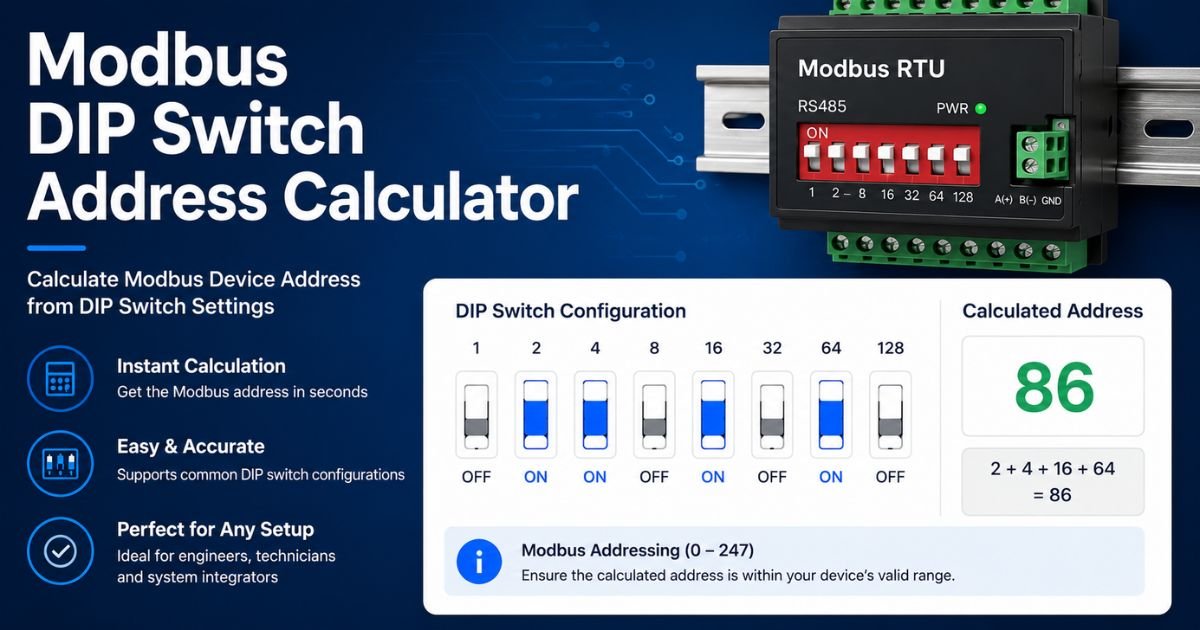
Modbus DIP Switch Address Calculator
Enter a Modbus address or toggle the eight DIP switches manually. The calculator shows the binary switch pattern, hexadecimal value, active switches, and Modbus address status.
Click any visual DIP switch below to toggle it ON or OFF.
How to Use the Modbus DIP Switch Address Calculator
Enter the Modbus device address and click Calculate. The calculator converts the decimal address into an 8-bit binary value and shows which switches should be ON.
You can also work in reverse. Click the visual DIP switches to reproduce the setting on a physical device. The decimal address, binary value, hexadecimal value, and address status update immediately.
Modbus Address Ranges
| Address | Purpose | Use as Individual Device ID? |
|---|---|---|
| 0 | Broadcast | No |
| 1–247 | Individual Device Addresses | Yes |
| 248–255 | Reserved | No |
Modbus DIP Switch Binary Values
With a standard binary switch arrangement, each switch represents a power of two. Add the values of all switches that are ON to get the resulting address.
| Switch | Value | Power of 2 | Binary Position |
|---|---|---|---|
| SW1 | 1 | 2⁰ | LSB |
| SW2 | 2 | 2¹ | Bit 1 |
| SW3 | 4 | 2² | Bit 2 |
| SW4 | 8 | 2³ | Bit 3 |
| SW5 | 16 | 2⁴ | Bit 4 |
| SW6 | 32 | 2⁵ | Bit 5 |
| SW7 | 64 | 2⁶ | Bit 6 |
| SW8 | 128 | 2⁷ | MSB |
Example: Modbus Address 37
Suppose you need to configure a Modbus device with address 37.
32 + 4 + 1 = 37
The switches that should be ON in the binary layout used by this calculator are:
SW6 + SW3 + SW1
The 8-bit binary representation is: 00100101.
Address 37 is within the normal individual Modbus device address range.
What Does Modbus Address 0 Mean?
Address 0 is reserved for Modbus broadcast communication on a serial network. It is not used as a normal individual slave or server address.
If all eight switches are OFF in this calculator, the resulting numerical value is 0. The calculator therefore labels the result as a broadcast address rather than a normal device ID.
What Happens Above Modbus Address 247?
An 8-bit DIP bank can mathematically create values through 255, but not every 8-bit value is available as a normal Modbus device address.
Values from 248 through 255 are reserved in the Modbus serial addressing space. The calculator still displays these values so you can identify a physical switch pattern, but it clearly marks them as reserved.
Check the Device Manual Before Setting the Switches
This calculator assumes a straightforward LSB-first binary address bank where SW1 represents 1 and SW8 represents 128.
Real Modbus equipment may use fewer address switches, reversed bit order, address offsets, rotary switches, software configuration, or additional switches for baud rate, parity, termination, or operating modes.
Frequently Asked Questions
What is a Modbus DIP switch address?
Some Modbus serial devices use physical DIP switches to configure their network address. Each address switch may represent a binary value.
What is the valid Modbus device address range?
Individual Modbus serial device addresses normally range from 1 through 247.
What is Modbus address 0?
Address 0 is the Modbus broadcast address. It is not assigned to an individual device.
Are Modbus addresses 248 through 255 valid?
They are reserved in the Modbus serial addressing space and should not be used as normal individual device addresses.
How do I calculate a Modbus DIP switch address?
For a binary address bank, add the values of all address switches that are ON. For example, 32 + 4 + 1 gives address 37.
Which DIP switches are ON for Modbus address 37?
With SW1 = 1, SW2 = 2, and so on, address 37 uses SW6, SW3, and SW1 because 32 + 4 + 1 equals 37.
Why does this calculator use eight switches?
An eight-bit bank can represent values from 0 through 255. This lets the calculator display the complete one-byte address pattern and identify valid, broadcast, and reserved values.
Can I click the DIP switches manually?
Yes. Toggle the visual switches and the decimal address, binary value, hexadecimal value, and Modbus status will update immediately.
Does every Modbus device use the same DIP switch layout?
No. Physical switch numbering and configuration can vary by manufacturer and device. Always verify the layout in the equipment manual.
Must each Modbus device have a unique address?
Yes. Devices that need to be addressed independently on the same Modbus serial network should have unique individual addresses.