
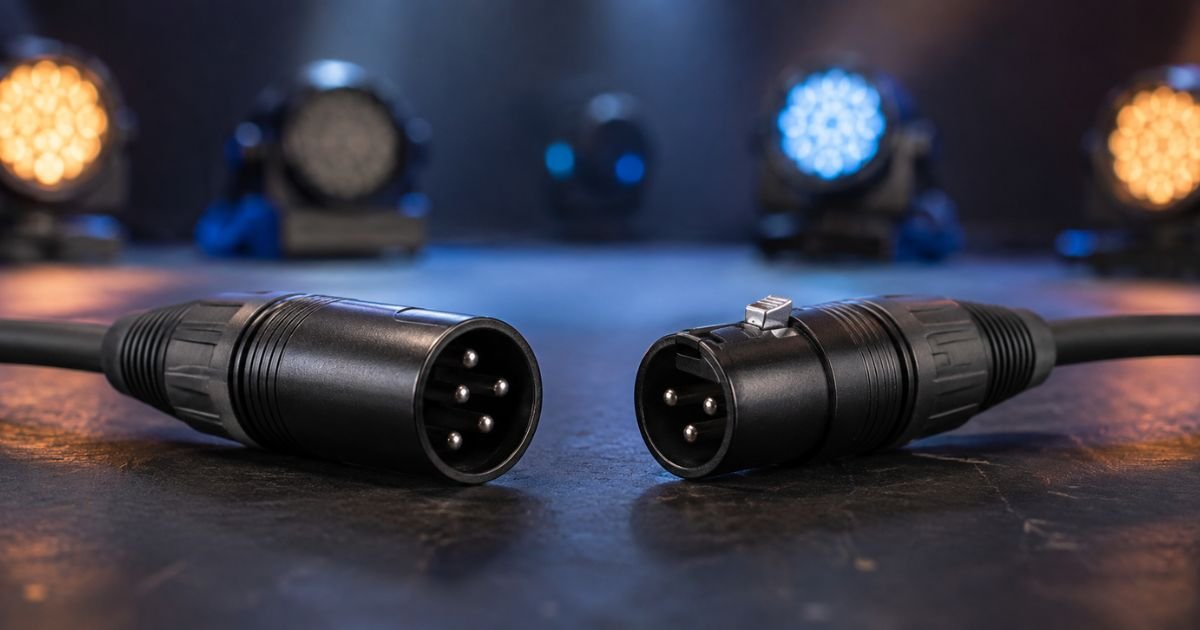
If you work with stage lights, moving heads, or LED fixtures, you have seen both 5-pin and 3-pin XLR cables labeled as DMX. They look similar, and both can carry lighting control data. Yet they are not the same.
The official DMX512 standard calls for 5-pin connectors. Many affordable fixtures still ship with 3-pin ports. Choosing the wrong cable or mixing them carelessly can cause flickering lights, random behavior, or even equipment damage.
This guide explains the differences clearly so you can build reliable systems and avoid common pitfalls.
5-Pin vs 3-Pin XLR
What Is DMX and Why the Connector Matters
DMX512 is the digital protocol that sends control instructions from a lighting console to fixtures. It runs over a balanced RS-485 style signal. The cable must carry that signal cleanly over long runs and multiple devices.
The connector is the physical link. The original standard deliberately chose a 5-pin XLR shell so lighting cables would not look exactly like microphone cables.
This reduces the chance of plugging a DMX line into an audio console that might send 48-volt phantom power into sensitive lighting electronics.
Official Standard: 5-Pin XLR
According to the ANSI E1.11 (DMX512-A) standard, portable DMX equipment must use 5-pin XLR connectors. Female connectors go on outputs (controllers and through ports). Male connectors go on inputs (fixtures).
Here is the standard pinout:
- Pin 1: Ground / shield
- Pin 2: Data – (negative)
- Pin 3: Data + (positive)
- Pin 4: Optional secondary Data –
- Pin 5: Optional secondary Data +
Pins 4 and 5 were reserved for a second data pair. In everyday use most systems leave them unused. Some advanced features such as RDM (Remote Device Management) can use the second pair for two-way communication, but many fixtures never wire them.
Because 5-pin is the official connector, professional theatres, touring productions, and permanent installs usually standardize on it. High-end consoles almost always provide 5-pin outputs.
Why 3-Pin XLR Became So Common
Only three wires are needed for basic DMX data. Manufacturers of budget and DJ-oriented gear quickly realized they could save money and board space by fitting ordinary 3-pin XLR connectors.
The 3-pin pinout simply copies the first three pins of the 5-pin standard:
- Pin 1: Ground / shield
- Pin 2: Data –
- Pin 3: Data +
Electrically the signal is identical. A proper 3-pin DMX cable works fine for short-to-medium runs with a modest number of fixtures.
The downside is practical. 3-pin XLR is the same connector used for microphones and line-level audio. It is easy to grab the wrong cable in a dark stage or mixed inventory. That is why the standard explicitly prohibits 3-pin XLR for DMX on equipment that has room for a 5-pin connector.
Cable Quality Matters More Than Pin Count
Many people think the number of pins decides reliability. In reality the cable construction is more important.
A true DMX cable is a low-capacitance, tightly twisted pair with characteristic impedance around 110–120 ohms and good overall shielding.
Microphone (audio) XLR cable typically has lower impedance (often 50–75 ohms) and different twisting. Using audio cable for DMX often works for a few fixtures over short distances.
Once you add more devices, longer runs, or fast effects, signal reflections and data errors appear as flickering, random strobing, or unresponsive lights.
Always buy cable clearly labeled for DMX use, whether it has 3-pin or 5-pin ends. Color-coding the jackets (for example purple or black with “DMX” printed) helps keep lighting and audio cables separate.
Compatibility and Adapters
You can connect 3-pin and 5-pin gear with simple passive adapters. A correct adapter maps:
- Pin 1 to Pin 1
- Pin 2 to Pin 2
- Pin 3 to Pin 3
Pins 4 and 5 stay open. No electronics or protocol conversion is involved.
Cheap or poorly made adapters sometimes cross pins or tie extra connections. Those create intermittent problems that are hard to diagnose. Buy adapters from reputable lighting suppliers and test them before a show.
Some fixtures offer both 3-pin and 5-pin ports. That convenience reduces the need for adapters in mixed systems.
Practical Comparison Table
| Feature | 5-Pin XLR DMX | 3-Pin XLR DMX |
|---|---|---|
| Official standard | Yes (ANSI E1.11) | No (prohibited by standard) |
| Pins used for basic DMX | 1, 2, 3 | 1, 2, 3 |
| Extra pins | 4 & 5 available | None |
| Risk of audio confusion | Very low | High |
| Typical use | Theatre, touring, pro installs | DJ, small events, budget gear |
| Cost | Slightly higher | Lower |
| Availability | Standard in pro inventory | Very common |
| Future features (RDM) | Possible on secondary pair | Not available |
When to Choose 5-Pin
Choose 5-pin when:
- You work in professional venues or rental houses that require standards compliance
- Your console and high-end fixtures already use 5-pin
- You want clear separation from audio cabling
- You may later add RDM or other advanced functions
- Long cable runs or large systems demand maximum reliability
Many touring and theatre technicians keep only 5-pin stock so every cable is unmistakable.
When 3-Pin Is Acceptable
3-pin is practical when:
- Your fixtures already have 3-pin connectors
- You run small portable systems or mobile DJ setups
- Budget and cable weight matter
- You label everything clearly and never mix audio and lighting cables
Just remember that true DMX-rated 3-pin cable is still required. Do not substitute microphone cables.
Common Mistakes to Avoid
- Using ordinary microphone XLR cable for DMX runs longer than a few meters.
- Forgetting to terminate the last fixture in the chain with a 120-ohm terminator.
- Running DMX cables tightly bundled with power cables, which injects noise.
- Buying the cheapest adapters without checking pin mapping.
- Assuming every 5-pin cable actually wires pins 4 and 5—many do not.
Best Practices for Reliable Systems
- Prefer 5-pin for any permanent or high-stakes installation.
- Keep a small stock of quality 3-to-5 and 5-to-3 adapters.
- Mark every cable clearly.
- Use proper DMX cable with the correct impedance.
- Always terminate the end of each universe.
- Test the full system at show intensity and with effects before doors open.
These simple habits prevent most of the mysterious flickering problems that appear mid-show.
FAQs About 5-Pin vs 3-Pin XLR
Can I use a regular XLR microphone cable for DMX?
You can for very short, simple setups, but it is not recommended. Microphone cable has the wrong impedance and often poorer shielding. Problems usually appear when you add fixtures or length.
Do pins 4 and 5 actually do anything?
In most basic DMX systems they are unused. They can support a secondary data link or RDM on some equipment, but many cables and fixtures leave them disconnected.
Is 5-pin always better than 3-pin?
For professional reliability and standards compliance, yes. For small portable systems where every fixture already has 3-pin ports, a good 3-pin DMX cable works well.
How do I convert between 3-pin and 5-pin safely?
Use a purpose-made passive adapter that connects only pins 1-2-3 correctly. Avoid any adapter that links extra pins or comes from an unknown source.
Conclusion
5-pin XLR is the official, preferred connector for DMX512. It keeps lighting and audio systems clearly separated and follows the published standard. 3-pin XLR remains widespread because it is cheaper and matches the three wires actually needed for basic control.
The real keys to reliable lighting control are proper 110–120 ohm DMX cable, correct termination, careful cable management, and clear labeling, regardless of whether the ends have three pins or five.
Choose the connector style that matches your equipment and venue requirements, then focus on cable quality and good practice. Your fixtures will thank you with rock-solid performance night after night.
Disclaimer: This article provides general educational information about DMX cabling practices. Always follow the current ANSI E1.11 standard, manufacturer instructions, and local safety codes. Improper cabling can cause equipment malfunction or damage. For critical productions, consult a qualified lighting technician.