
If you have ever set a DIP switch for an I2C address, sensor ID, or device configuration and wondered why the number came out wrong, you have probably run into the MSB vs LSB question.
Knowing which end of the switch row is the most significant bit versus the least significant bit makes the difference between a working setup and hours of head-scratching. This guide clears up the confusion once and for all with simple visuals, real examples, and the exact steps to get it right every time.
Whether you are a hobbyist, student, or technician, understanding bit order in DIP switches is a skill that pays off immediately.
The Standard Rule and Why It Matters
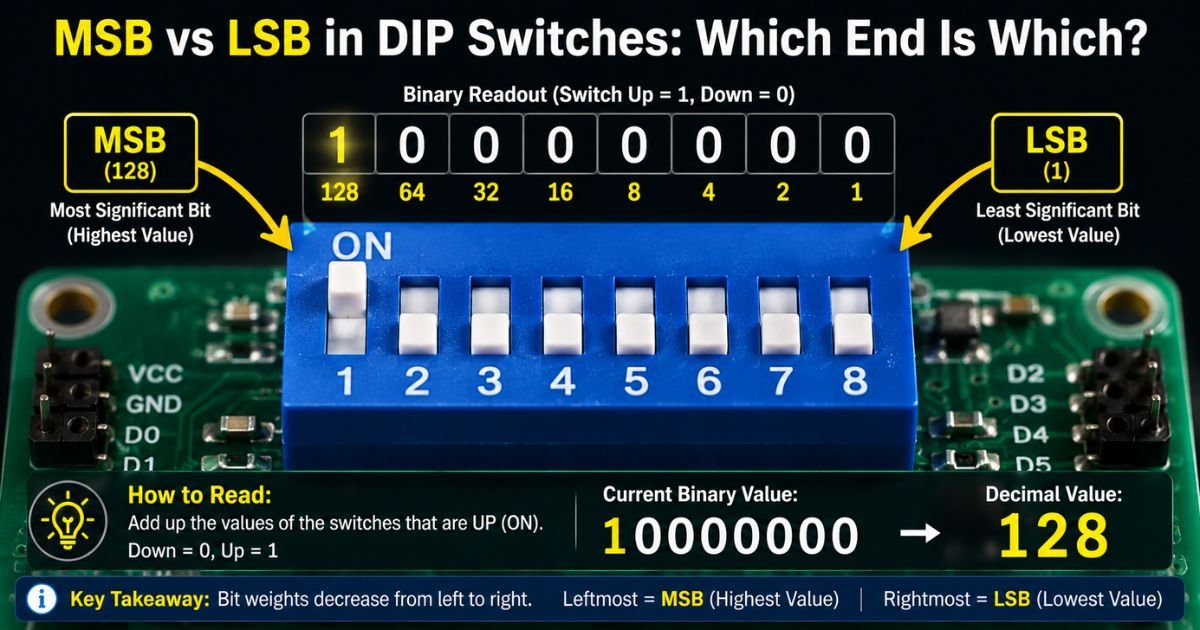
In the vast majority of DIP switches, the leftmost switch (when you are looking at the top with the pins pointing down) is the Most Significant Bit (MSB). The rightmost switch is the Least Significant Bit (LSB).
This means an 8-position switch follows this weighting:
| Position (left to right) | Bit Weight | Value when ON |
|---|---|---|
| 1 | MSB | 128 |
| 2 | 64 | |
| 3 | 32 | |
| 4 | 16 | |
| 5 | 8 | |
| 6 | 4 | |
| 7 | 2 | |
| 8 | LSB | 1 |
Turn on only the leftmost switch and you get 128. Turn on only the rightmost and you get 1. It is simple binary, but the direction matters hugely.
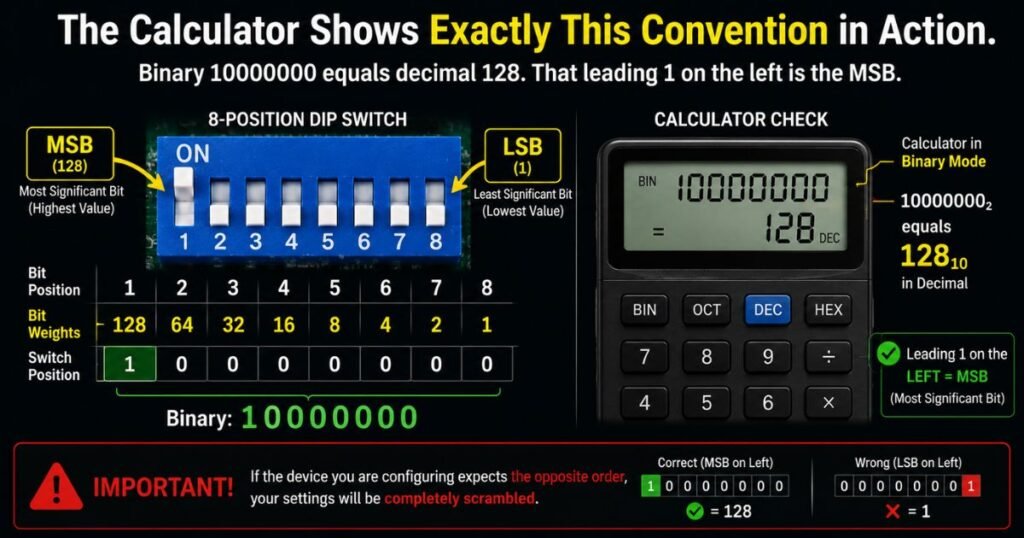
The calculator above shows exactly this convention in action. Binary 10000000 equals decimal 128. That leading 1 on the left is the MSB. If the device you are configuring expects the opposite order, your settings will be completely scrambled.
What MSB and LSB Actually Mean in DIP Switches
MSB stands for Most Significant Bit. It carries the highest place value, just like the “hundreds” digit in a three-digit number. Changing the MSB flips the biggest chunk of the final number.
LSB stands for Least Significant Bit. It is the smallest unit, like the “ones” place. It only adds or subtracts 1 from the total.
When you flip switches on a DIP, you are literally building a binary number. The device reads that number as soon as it powers up and uses it for an address, mode, or setting. Get the order backwards and the number you think you set is actually its mirror image in binary.
The Most Common Convention: Left = MSB
Ninety percent of the time, manufacturers follow the left-to-right MSB-to-LSB rule. You see this on:
- Most slide and piano DIP switches used in Arduino and Raspberry Pi projects
- Industrial sensors and PLC modules
- Old PC motherboards and expansion cards
- Many garage door and security system remotes
If your manual shows a picture of the switch with position 1 on the left and lists values starting with 128, you are looking at the standard layout.
How to Confirm Bit Order on Your Specific Device
Never assume. Here is the foolproof method:
- Look at the device manual or datasheet first. It will almost always include a diagram showing bit positions.
- Check for printed numbers on the switch itself (1 through 8). Position 1 is usually MSB.
- Search the part number online + “datasheet” and look for the “switch configuration” or “address setting” section.
- If still unsure, set only one switch at a time, power up, and read the resulting value on the device (many show the address on a display or via software).
Visual Examples and Binary Calculations
Let’s walk through a real example. You want to set I2C address 0x4A on a sensor.
0x4A in binary is 01001010.
Using standard left=MSB:
- Switch 1 (MSB): 0 → OFF
- Switch 2: 1 → ON (64)
- Switch 3: 0 → OFF
- Switch 4: 0 → OFF
- Switch 5: 1 → ON (8)
- Switch 6: 0 → OFF
- Switch 7: 1 → ON (2)
- Switch 8 (LSB): 0 → OFF
Total = 64 + 8 + 2 = 74 decimal, which is correct for 0x4A.
Now reverse the order (right = MSB) and the same pattern would give you a completely different address. That is why the order matters.
When Manufacturers Break the Rule
Some devices do reverse the bit order. You will see this most often with:
- Certain rotary DIP switches
- Older European or Japanese equipment
- Custom modules where the designer wired the bits backward for layout reasons
In these cases the manual will explicitly say “MSB on right” or show a reversed diagram. Always trust the manual over general rules.
Practical Tips for Accurate Configuration
- Print the manual page with the switch diagram and keep it next to you while setting switches.
- Use a bright light and magnifying glass. Tiny “1” and “8” labels are easy to misread.
- Set switches with the power off. Some devices latch the value only at startup.
- After setting, power cycle and verify the actual address or mode the device reports.
- Keep a small notebook of common addresses and their switch patterns for projects you repeat.
These habits turn a frustrating task into a two-minute job.
FAQs About MSB vs LSB in DIP Switches
Is the leftmost switch always the MSB?
In the large majority of cases yes, but never assume. Check the datasheet or manual for your exact part. A few manufacturers reverse the order for their specific wiring.
How do I calculate the decimal value quickly?
Start from the left (MSB = 128) and add the value of every switch that is ON. Or use an online DIP switch calculator. Either way, write down the binary pattern first so you can spot mistakes easily.
What happens if I get MSB and LSB backwards?
Your device will interpret the address or setting as a completely different number. In communication systems this usually means the device simply will not respond or will respond on the wrong channel. It is one of the most common reasons “it worked in the lab but not in the field.”
Conclusion
MSB vs LSB confusion in DIP switches is one of those small details that causes big problems until you understand it. Once you know the standard left-to-right rule and how to double-check with the manual, you will configure devices confidently every single time.
The next time you open a project and see that row of switches, you will immediately know which end carries the big value and which carries the small one. No more guessing, no more reversed addresses, just clean, reliable setups.
Disclaimer: This article provides general educational guidance based on common industry conventions. Always refer to the specific datasheet and manual for the exact component or device you are using, as bit ordering can vary by manufacturer.