
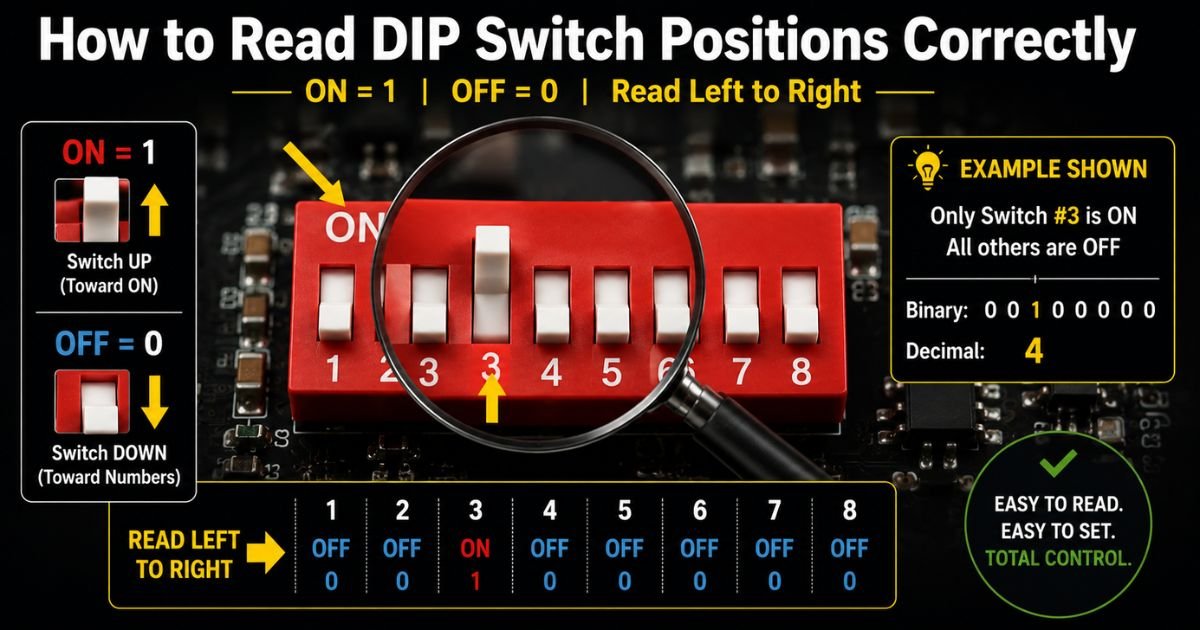
Have you ever stared at a row of tiny switches on a circuit board and wondered, “Which way is actually ON?” You are not alone. Misreading just one position can turn a perfectly good device into a frustrating puzzle.
Learning how to read DIP switch positions correctly saves time, prevents headaches, and gives you full control over your electronics. Whether you are setting an address on an industrial sensor, configuring an old garage door opener, or tweaking settings on a custom project, getting the positions right is the first real skill you need.
In this complete visual guide, I will show you exactly how to identify the ON direction, understand binary values, read manufacturer charts, and avoid the most common mistakes. By the end, you will read any DIP switch like a pro.
Mastering the Basics of DIP Switch Reading
The secret to reading DIP switches starts with one simple fact: every switch has a clear “ON” side, but manufacturers do not always make it obvious at first glance.
Most DIP switches print the word ON directly on the plastic housing, usually on the left or top edge. Some use a small arrow, a raised dot, or even a tiny triangle pointing toward the ON direction. Once you spot that marker, everything else falls into place.
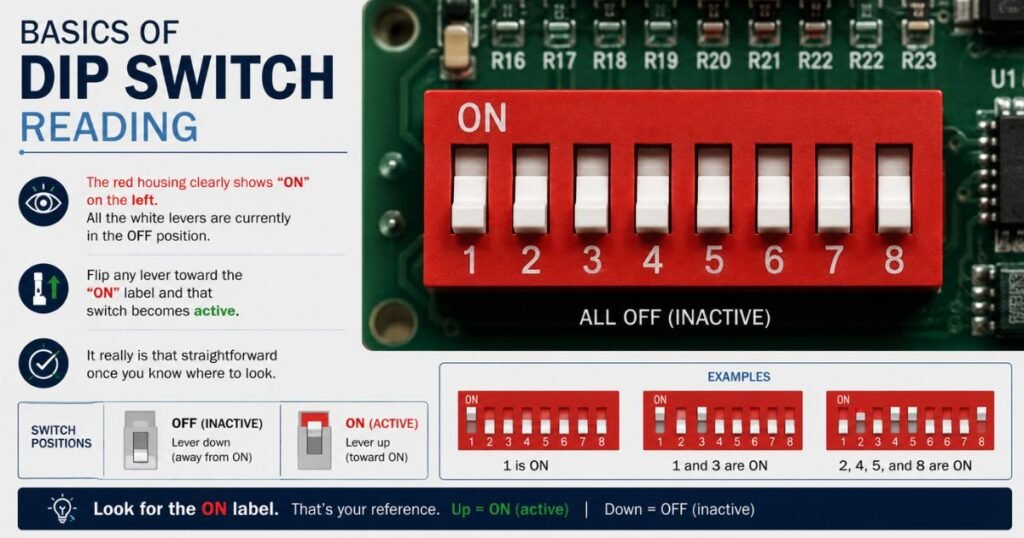
Look at the clean example above. The red housing clearly shows “ON” on the left. All the white levers are currently in the OFF position. Flip any lever toward the “ON” label and that switch becomes active. It really is that straightforward once you know where to look.
Identifying the ON Direction on Any DIP Switch
Here is the exact process I use every single time:
- Hold the switch so the pins point downward (the way it sits on a PCB).
- Scan the body for the word “ON”, an arrow, or a small indicator.
- If nothing is printed, check the device manual or look for a tiny dot on one end.
- Test with a multimeter in continuity mode if you are still unsure (ON position shows continuity between the pin and common).
Some older or imported switches flip the labeling, so never assume. Always verify.
Pro tip: Take a photo of the switch before you change anything. That way you have a record of the original positions if you need to go back.
Understanding Binary Values and Position Numbers
Most DIP switches use binary numbering, where each position represents a power of two.
Here is a quick reference table for an 8-position switch (leftmost switch is usually the most significant bit):
| Switch Position | Binary Value (when ON) | Example Use |
|---|---|---|
| 1 (left) | 128 | High address bit |
| 2 | 64 | |
| 3 | 32 | |
| 4 | 16 | |
| 5 | 8 | |
| 6 | 4 | |
| 7 | 2 | |
| 8 (right) | 1 | Lowest bit |
Want the device to read address 45? Turn ON switches 3, 5, 6, and 8 (32 + 8 + 4 + 1 = 45). It is simple math once you get the hang of it.
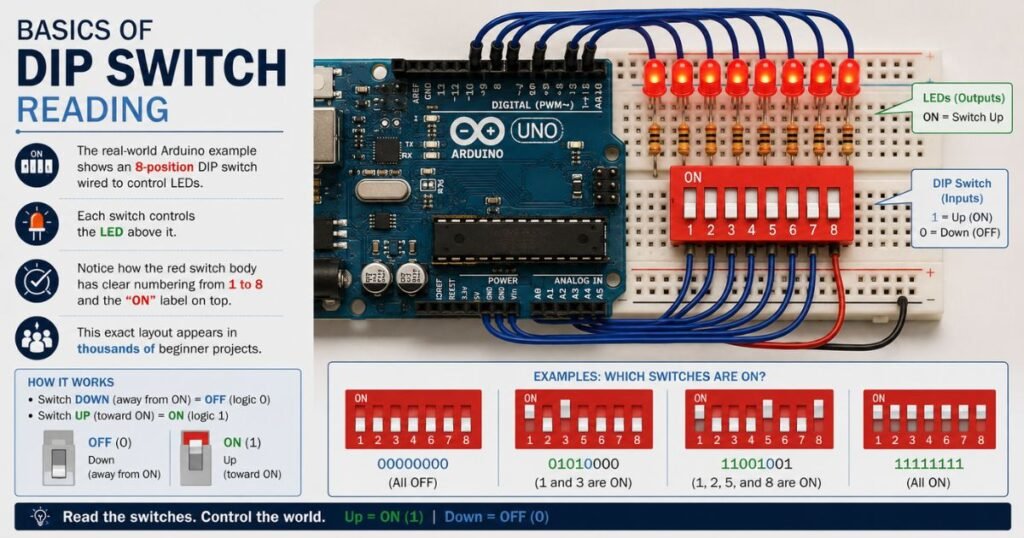
The real-world Arduino example above shows an 8-position DIP switch wired to control LEDs. Notice how the red switch body has clear numbering from 1 to 8 and the “ON” label on top. This exact layout appears in thousands of beginner projects.
Reading Manufacturer Configuration Charts
The easiest way to read positions correctly is to follow the chart that came with your device.
These charts usually show:
- A small drawing of the switch row
- Which positions should be ON for each mode or address
- Sometimes a binary or decimal equivalent
Always match the orientation in the manual to the physical switch exactly.
Step-by-Step Process to Read Any DIP Switch Correctly
Follow these steps in order and you will never second-guess yourself again:
- Power the device completely off.
- Locate the DIP switch and note its orientation on the board.
- Find the “ON” marker on the switch housing.
- Read each position number from left to right (or as labeled).
- Compare against the device manual or desired setting.
- Use a small tool to gently move levers if needed.
- Double-check by counting the binary value if the setting is numeric.
- Power on and verify the device behaves as expected.
That is the entire reliable process. It takes less than two minutes once you have done it a few times.
Common Mistakes and How to Avoid Them
Even experienced builders mess this up occasionally. Here are the top three errors I see:
- Assuming left is always ON (many switches print ON on the right).
- Reading the chart from the wrong viewing angle.
- Forgetting that some rotary or piano-style switches work differently.
The pointing-hand illustration below shows exactly where to focus your attention.
When in doubt, use a bright light and a magnifying glass. Those tiny labels can be hard to read on older equipment.
Tools That Make Reading DIP Switches Easier
You do not need fancy equipment, but these simple items help:
- Small flathead screwdriver or plastic spudger
- Bright LED flashlight or headlamp
- Digital multimeter (for confirmation)
- Phone camera with macro mode (to zoom in on tiny print)
- Printed copy of the device manual
Many people keep a cheap “DIP switch tool” in their kit. It is literally just a tiny plastic stick with a flat end, but it prevents bent levers.
Why Reading Positions Correctly Actually Matters
Getting the positions wrong does more than just annoy you. In industrial settings, a single flipped switch can cause an entire production line to stop. In security systems, it can disable zones without anyone noticing. In hobby projects, it wastes hours of debugging.
Accurate reading gives you confidence. You stop guessing and start knowing exactly what your hardware is doing.
FAQs About Reading DIP Switch Positions
What if my DIP switch has no “ON” label printed on it?
Check both ends of the housing carefully. Some manufacturers use a small raised dot, triangle, or even a color difference. If you still cannot tell, download the datasheet from the manufacturer website or test with a multimeter in continuity mode. The position that shows continuity is ON.
Do all DIP switches read from left to right as the most significant bit?
Most do, but always verify with the manual. Some older equipment or special rotary DIP switches number differently. The safe rule is: follow the chart that came with your specific device.
Can I damage a DIP switch by flipping it too many times?
Modern DIP switches are rated for thousands of cycles, so normal use will not hurt them. Just avoid forcing stuck levers or using excessive pressure. If a switch feels gritty or does not click cleanly, it is time to replace the whole unit.
Conclusion
Reading DIP switch positions correctly is one of those foundational skills that makes every other electronics project easier. Once you master the “ON” marker, binary values, and manufacturer charts, you will never waste time guessing again.
The next time you open a device and see that row of tiny levers, you will know exactly what to do. Grab your flashlight, find that “ON” label, and take control of your hardware like a true expert.
Disclaimer: This guide is for educational purposes only. Always consult the official manual for your specific device and follow all safety precautions when working with electronic equipment. If you are unsure about any step, seek help from a qualified technician.