
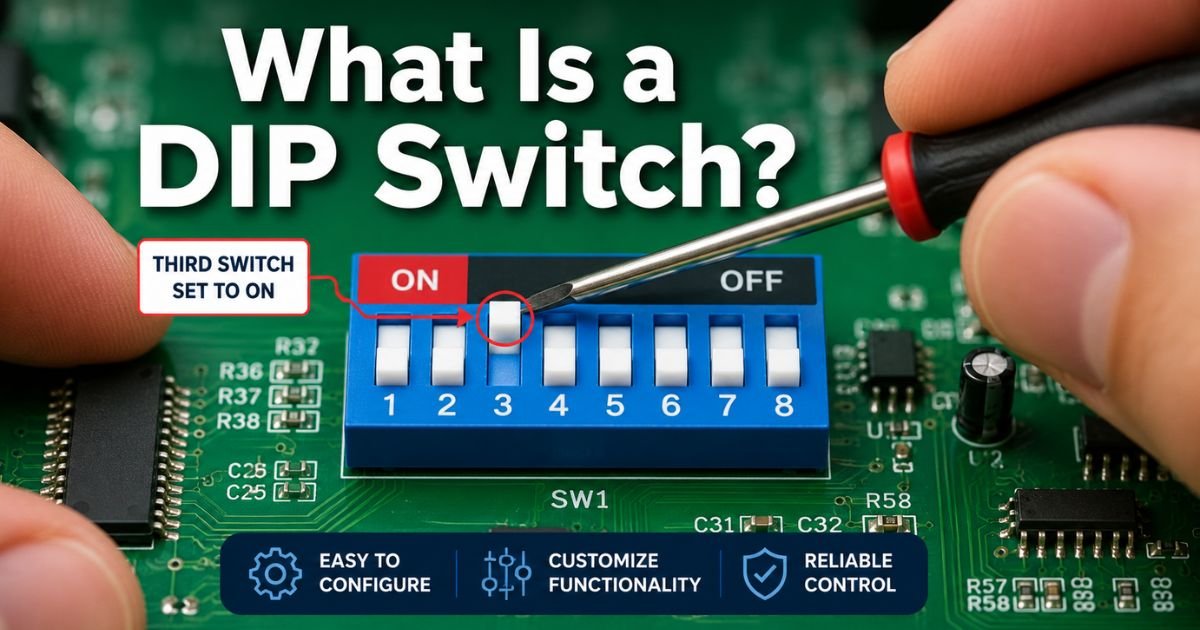
Ever cracked open an old garage door remote or peeked inside an industrial control box and spotted those tiny rows of little levers? You were looking at a DIP switch. These humble components have been quietly configuring electronics since the 1970s, and they still show up in surprising places today.
If you are new to electronics or just curious about how hardware settings work without software, this visual guide breaks everything down in plain English. We will cover what a DIP switch is, how it works, the different types you will see, and exactly how to set one up yourself.
How DIP Switches Work: The Simple Truth Behind Those Tiny Levers
A DIP switch stands for Dual In-line Package switch. It is basically a row of tiny manual on/off switches packed into one neat little housing that solders directly onto a printed circuit board (PCB).
Each individual switch acts like a light switch for electricity. When you slide or rock it to the ON position, it completes a circuit. Flip it to OFF and the circuit breaks. That is it. No power required to remember the setting. The device simply reads the physical positions when it powers up.
Think of it like old-school binary code made physical. Each switch represents one bit: ON usually means 1, OFF means 0. Put eight switches together and you suddenly have 256 possible combinations. That is why they are perfect for setting device addresses, enabling features, or matching codes between a remote and receiver.
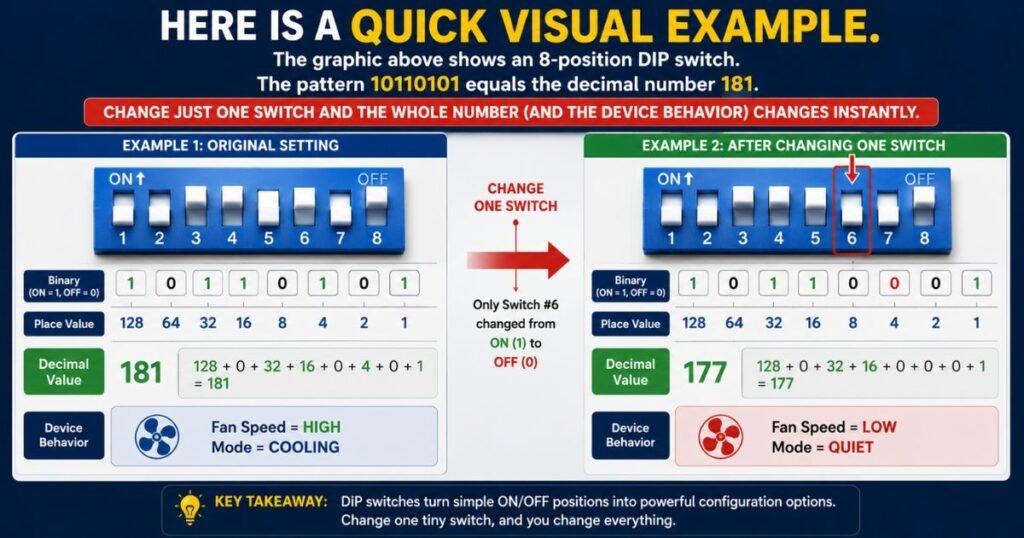
Here is a quick visual example. The graphic above shows an 8-position DIP switch. The pattern 10110101 equals the decimal number 181. Change just one switch and the whole number (and the device behavior) changes instantly.
What Does a DIP Switch Actually Look Like?
Most DIP switches are small black or blue rectangles, about the size of a stick of gum or smaller. You will usually see between 2 and 12 tiny levers or slides lined up in a row. Numbers or dots mark each position so you know which switch is which.
They mount flush on the PCB with two rows of pins underneath, just like an integrated circuit chip. That is where the “dual in-line” name comes from.
Look closely and you will often see “ON” printed on one side of the housing. That tells you which direction means on. Some models even have red paint or a raised bump on the ON side for extra clarity in low light.
Types of DIP Switches You Will Encounter
Not all DIP switches look or work the same. Here are the main styles you will run into:
Slide switches are the most common. You push a tiny white or black tab left or right. Simple and reliable.
Piano or rocker switches have levers that rock up and down like tiny piano keys. They feel satisfying to flip and are easier for bigger fingers.
Rotary DIP switches use a small knob you turn to select numbers or codes. One knob can replace four or more slide switches.
SMD (surface-mount) versions are tiny flat versions made for modern automated assembly lines.
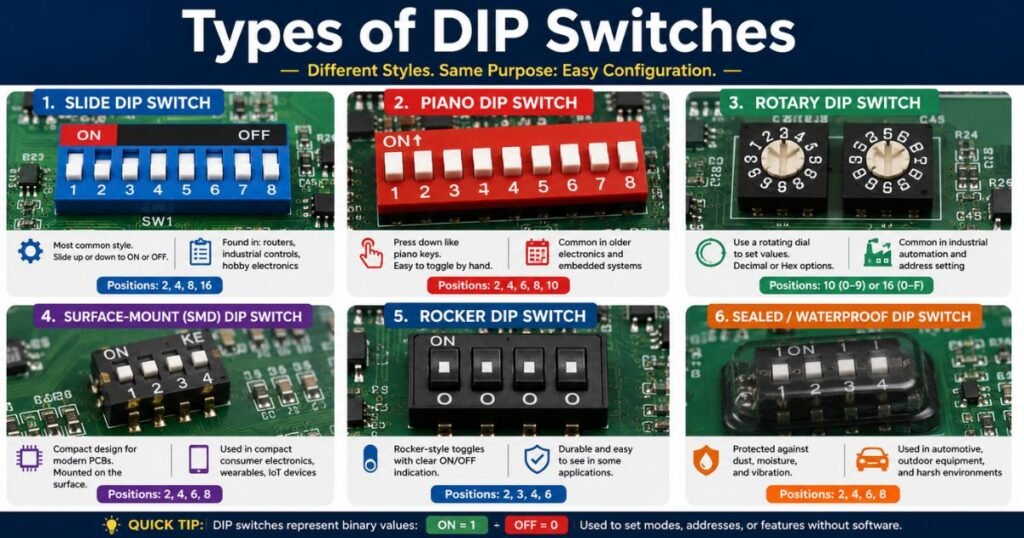
The image above shows many of these side by side so you can spot the differences next time you open a device.
How to Read and Set DIP Switch Positions
Reading a DIP switch is straightforward once you know the code. Most devices print a chart in the manual that shows exactly which switches to turn on for each setting.
Here is a simple example for an 8-switch model:
Switch positions and what they mean:
- Switch 1 (leftmost) = 128 (if ON)
- Switch 2 = 64
- Switch 3 = 32
- Switch 4 = 16
- Switch 5 = 8
- Switch 6 = 4
- Switch 7 = 2
- Switch 8 (rightmost) = 1
Want address 45? Turn on switches for 32 + 8 + 4 + 1. That is switches 3, 5, 6, and 8.
Always power the device off before changing switches. Then flip them gently with your fingernail, a small screwdriver, or the tool that sometimes comes with the device. Never force them.
Common Places You Will Find DIP Switches Today
You might think these switches disappeared with floppy disks, but they are still everywhere in 2026.
- Garage door openers (especially older models) use them to set matching codes between the wall unit and handheld remote.
- Industrial automation relies on them for setting unique addresses on sensors, PLCs, and motor controllers so multiple devices can share the same communication line.
- Security systems and alarm panels use them to select zones or disable features.
- Arcade machines and pinball tables still use them for difficulty settings and coin mechanisms.
- Networking gear and some IoT modules use them for quick IP address or mode selection without connecting to a computer.
They shine in situations where you want rock-solid settings that survive power loss and do not require a screen or app.
Configuring a DIP Switch Like a Pro: Step-by-Step
Ready to try it yourself? Follow these simple steps.
- Locate the DIP switch on your device. It is usually near the edge of the board and labeled clearly.
- Turn the entire device completely off and unplug it if possible.
- Check the manual or device label for the recommended settings. Many list binary patterns or simple “up for on” charts.
- Use a small tool to move each switch to the correct position. Listen for a soft click.
- Double-check your work against the chart. One wrong switch can cause weird behavior.
- Power the device back on and test. The new settings take effect immediately in most cases.
Pro tip: Take a quick photo of the original positions before you change anything. That way you can always go back if something goes wrong.
Pros, Cons, and Why DIP Switches Still Matter in 2026
Advantages
- No software or battery needed to store the setting
- Instantly visible configuration
- Cheap and extremely reliable
- Work in harsh environments where touchscreens would fail
Disadvantages
- Limited to the number of switches (usually 256 combinations max per bank)
- Takes up board space
- Not as flexible as menu-driven software for complex setups
Many engineers still choose them for industrial equipment because they are simple, cheap, and impossible to “hack” remotely. When reliability beats convenience, DIP switches win every time.
Troubleshooting Common DIP Switch Issues
Switch not responding? Here is what to check:
- Make sure the device is powered off when you change settings.
- Verify the “ON” direction matches the manual (some manufacturers flip the labeling).
- Look for dirt or bent pins underneath the switch.
- Test with a multimeter in continuity mode if you are comfortable doing so.
- Replace the whole switch if one position feels mushy. They are inexpensive and easy to swap.
FAQs About DIP Switches
How do I know which way is ON on my DIP switch?
Most DIP switches print the word “ON” on one side of the plastic housing. Flip the lever toward that side for ON. When in doubt, check the device manual. It almost always includes a clear diagram.
Can I use a DIP switch instead of software settings?
Yes, and many people prefer it for critical settings. DIP switches give you instant, visible control that does not depend on firmware or a working screen. They are especially popular in industrial and security equipment where you want settings that survive a full power loss.
Are DIP switches still relevant with modern microcontrollers?
Absolutely. While many consumer gadgets moved to software menus, DIP switches remain popular in factories, building automation, and any place where you need simple, tamper-resistant configuration without extra parts or power. They are not going away anytime soon.
Conclusion
DIP switches may look old-school, but they remain one of the smartest, simplest ways to customize electronic devices. Whether you are matching a garage door remote, setting an industrial sensor address, or just exploring how hardware works, understanding these little switches opens up a whole new layer of electronics knowledge.
Next time you see that row of tiny levers, you will know exactly what they do and how to use them. Grab a screwdriver and give it a try. You might be surprised how satisfying it feels to flip those switches and watch your device behave exactly the way you want.
Disclaimer: This article is for educational and informational purposes only. Always follow the specific instructions in your device’s manual and observe proper safety procedures when working with any electronic equipment. If you are unsure, consult a qualified technician.